Trackback Pings to FP8 mailto with subject
TrackBack URL: http://www.flashpearls.com/cgi-bin/mt-tb.cgi/167.
02/27/07: Jon Aldinger, Mark Huot, & Dan Mall present swfIR: swf Image Replacement
02/21/07: flashBug is an Actionscript class that writes debug information out to Firebug's console
02/06/07: Geoff Stearns and Bobby van der Sluis join forces to create one Flash embed method to rule them all: SWFFix
11/16/06: SWFUpload adds the advantages of uploading files with Flash to your web applications.
Yesterday I ran into an interesting quirk involving the Flash Player 8 while doing some freelance work. It deals with creating a mailto link in Flash that includes a subject line and testing it locally.
All the client needed was a simple link that would open up the user's email program and insert the proper email address and subject line. So as I've always done, I created a button and added the following code:
on(release) {
	getURL("mailto:email@address.net?subject=Test");
}
Nothing fancy there, just your most basic way to send an email with a subject line. I test it out in my browser like usual... Outlook opens up a "New Message" window... "To:" address is prepopulated, but the "Subject:" line is blank. Didn't expect that to happen.
So I thought maybe Flash was stripping out the "?" and everything after it for some reason. To test my theory, I try linking to Google and adding "?testing" to the end of the URL, like so:
on(release) {
	getURL("http://www.google.com/?testing");
}
When I click that link, the following message box appears:
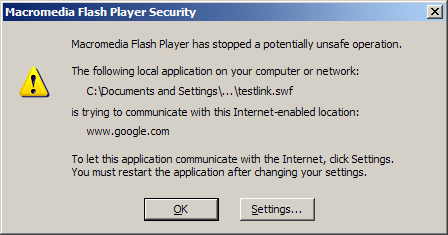
That reminded me about the new Flash Player 8 security changes and how local content cannot access remote files. I wasn't sure if that was related to my problem, so I clicked "Settings..." and I was brought to the Flash Player Settings Manager page.
It was the first time I'd come across the Settings Manager, and I was surprised to see the Advanced Settings are actually set in special Flash movie you access from a webpage on Macromedia's website. If you haven't seen it yet, here's a screenshot:
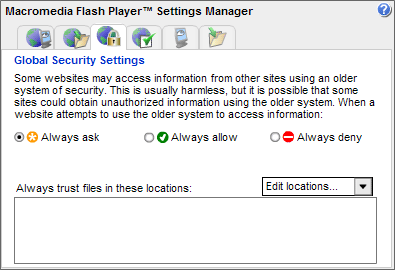
Note: The Settings Manager that you see above is an image; it is not the actual Settings Manager itself.
The obvious next step here was to edit my locations of trusted local content. So I clicked the "Edit locations..." dropdown, selected "Add Location," and I was presented with this:

Bravo Macromedia! I applaud your work on this. The path I needed to add was listed right there for me to copy and paste. So I copy and paste the directory (I didn't include the file, because I want to trust the entire directory) and click "Confirm."
The path is now displayed as a trusted location:
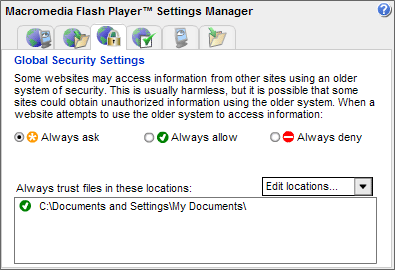
So I close the browser and reopen my test page. I click the link and I am successfully brought to http://www.google.com/?testing. Great. Now time to test if this affects my "mailto" link. So I change the getURL url back to "mailto:email@address.net?subject=Test" and give it a shot. I click the link, and Outlook opens with both the "To:" and "Subject:" fields prepopulated as I wish. Woohoo!
This is of course leading me to believe that when run locally, the Flash Player 8 does strip out the question mark and everything after it in the url, but does not alert the user, unless you make the security setting change that I did. To be 100% sure of my theory, I change the link to the following:
on(release) {
	getURL("index.html?testing");
}
I create a quick default index.html file locally and give it a test run. I click the link and... I'm only brought to index.html... no "?testing" at the end of it. Not what I expected. I tried using "GET" as well and that didn't work:
on(release) {
	getURL("index.html?testing","","GET");
}
So what have I learned from all of this? It appears that when run locally, Flash Player 8 will always strip the question mark and anything following it off the end of the url of the getURL function, regardless of security settings. However, if the url in the getURL function is a mailto link AND your security settings are set to trust your local location, it will prepopulated the values as you wish.
Of course, when the file is uploaded to the internet this isn't an issue, but if you test your work locally first, this knowledge will hopefully save you some headaches.
TrackBack URL: http://www.flashpearls.com/cgi-bin/mt-tb.cgi/167.

Thanks! That tidbit about the "?" on the local machine was very handy. I would have been tearing my hair out for ages had I not read this!

you are the man!!!!!!!!!!!!!!
Thank you very much!!!!!!!!!!!!!!!!
you save from a heart attack!!!!!!!!!

Very nice summary -- I had the same problem, and your article provided me with a simple answer and solution. Thanks for the information!

THANK YOU! THANK YOU! THANK YOU! THANK YOU! THANK YOU!
I've wasting my time for long hours!!!
THANK YOU!
Before wasting hours, a quick google search and you have the answer.... Thank you for this tip.

Does anyone know if it is possible in Flash/html or Java to get a mailto link to insert images(jpeg) into a mail aswell as the recipient and subject. I have found html code which allows you to insert text into the body of the email but not an image. Any help on this would be great.
Perfect! you action script works awesome for me! Thanks a lot man!

ok .. but need help with mailto: locally for flash projector email capacity. The flash exe will be distributed and you can not expect people to understand flash security so is there a way to simply invoke the local email client from a local flash exe?? thanks!

It really helped me thankyou....

Thanks! you saved me from wasting time as I found this post before I started.

thanks so much!!! you saved my ass! excelent clue.
Hello!
http://viagra4saleonline.com , , http://cialis4saleonline.com , ,
Hello!
http://fast3deliverycialis.com/ , , http://cialis3pills.com/ , ,
Hello!
http://fast3deliverycialis.com/ , , http://cialis3pills.com/ , ,
Hello!
http://fast3deliverycialis.com/ , , http://cialis3pills.com/ , ,
Hello!
http://viagra3discount.com/ , , http://pharmacy3onlinecialis.com/ , ,
Hello!
http://viagra4sildenafil.com/ , , http://cialis4tadalafil.com/ , ,
Hello!
http://discount4viagraonline.com/ , , http://discount4cialisonline.com/ , ,
Hello!
http://fast4delyvery4viagra.com/ , , http://fast4delyvery4cialis.com/ , ,
Hello!
http://fast4delyvery4viagra.com/ , , http://fast4delyvery4cialis.com/ , ,
Hello!
http://viagra5withoutprescription.com/ , , http://cialis5withoutprescription.com/ , ,
Hello!
http://viagra5withoutprescription.com/ , , http://cialis5withoutprescription.com/ , ,
http://fastdelivbery7viagra.com/ , http://fastdelivbery7cialis.com/ ,
http://viagra7professiona7l.com/ , http://cialis7superactive7.com/ ,
Hello!
http://buygenericviagra7now.com/ , , http://buygenericcialis7now.com/ , ,
Hello!
http://buygenericviagra7now.com/ , , http://buygenericcialis7now.com/ , ,

I was delighted to find this web site.I wanted to thank you for your time reading this wonderful! I really enjoyed every bit of it and I've marked to ensure that the blog post something new.

I was working and suddenly I visits your site frequently and recommended it to me to read also. The writing style is superior and the content is relevant. Thanks for the insight you provide the readers!

Great tips, many thanks for sharing. I have printed and will stick on the wall I like this blog.

Hey, its an amazing information dude. Thanks for sharing this great.

You provided a valuable service to the community. Thank you for doing such a great job all these years.

Thanks for sharing this great and good information with everyone.
Hello Dear, Really your blog is very interesting.... it contains great and unique information. I enjoyed to visiting your blog. Its just amazing.... Thanks very much.
They use all natural ingredients to create organic products.
I am so happy to read this. This is the kind of manual that needs to be given and not the random misinformation that's at the other blogs. Thanks for sharing this.
Well, very good post with informative information. I really appreciate the fact that you approach these topics from a stand point of knowledge and information. This is the first time, I visited at your site and became your fan. You are bookmarked. Please keep on posting.
Preservation and promotion of health is achieved through a combination of physical, mental and social well-being, sometimes called "the triangle of health." Health is a positive concept focuses on the social and personal resources, as well as physical capacities.
Hello, an amazing Information dude. Thanks for sharing this nice information with us.
Thanks for sharing it. I found this Information very interesting and informative Keep sharing
Thanks for your many years of a great service well done! I’ve always felt good about listing my concerts with you and linking from my website.
Nice to share my love is wonderful to tell you that a healthy green gives you the best Organic vitamins, herbal remedies and organic supplements.
Hey great stuff, thank you for sharing this useful information and i will let know my friends as well.
Interesting Article. Hoping that you will continue posting an article having a useful information.
This is a really informative knowledge, Thanks for posting this informative Information.
Thanks for the informative writing. Would mind updating some good tips about it. I still wait your next place.
Hey great stuff, thank you for sharing this useful information and i will let know my friends as well.
Hey, its an amazing information dude. Thanks for sharing this great.
Congratulation for the great post. Those who come to read your Information will find lots of helpful and informative tips.
Thanks dude! You know this information is really helpful for everyone.
Preservation and promotion of health is achieved through a combination of physical, mental and social well-being, sometimes called "the triangle of health." Health is a positive concept focuses on the social and personal resources, as well as physical capacities.
Hi This is exactly what I was looking for. Thanks for sharing this great Information That is very interesting smile I love reading and I am always searching for informative information like this You are bookmarked
This was a really outstanding post. In theory I would like to compose like this too - taking time and real effort to make solid Information.
Thanks for the great post. You have a well written and informative blog especially for us.
I already saw many blogs but I like this commenting platform. Thanks a lot for your guidance and sharing information.
I agree with you. This post is truly inspiring. I like your post and everything you share with us is current and very informative, I want to bookmark the page so I can return here from you that you have done a fantastic job ...
Thanks a lot for sharing this amazing knowledge with us. This site is fantastic. I always find great knowledge from it.
I am so glad this internet thing works and your Information really helped me. Might take you up on that home advice you.
Hello!
http://withoutprescription9viaggra.com/ , , http://withoutprescription9cialis.com/ , ,
Hello!
http://withoutprescription9viaggra.com/ , , http://withoutprescription9cialis.com/ , ,
Hello!
http://withoutprescription9viaggra.com/ , , http://withoutprescription9cialis.com/ , ,
http://genericpharmacy10online.com/ , http://genericpharmacy110online.com/ ,
Hello!
http://10sildenafilonline.com/ , , http://101tadalafilonline.com/ , ,
http://canada10pillsonline.com/ , http://canada10cpillsonline.com/ ,